Docusign workflows that start on their own.
When Salesforce, HubSpot or any app that sends JSON posts an event, Baton Core verifies it and launches the Docusign Workflow Builder workflow. Upload a spreadsheet and it starts one workflow per row.
Three steps. One afternoon.
Done for good.
Connect Docusign
One-time OAuth. Baton reads your Docusign workflows and can launch them on your behalf.

Pick source & target
Choose the CRM event. Choose the Docusign workflow. Baton mints a signed, unique webhook URL.

Paste URL, done
Paste into your CRM's webhook settings. Add the signing secret. Baton handles verification, routing, and monitoring.
From there, every qualifying event in your CRM automatically fires the right Docusign workflow, and everything surfaces in your command center.
Every automation.
Every run. Every failure.
One place. No digging through Docusign, no switching tabs. Failures surface in red, retries are one click, logs open inline.
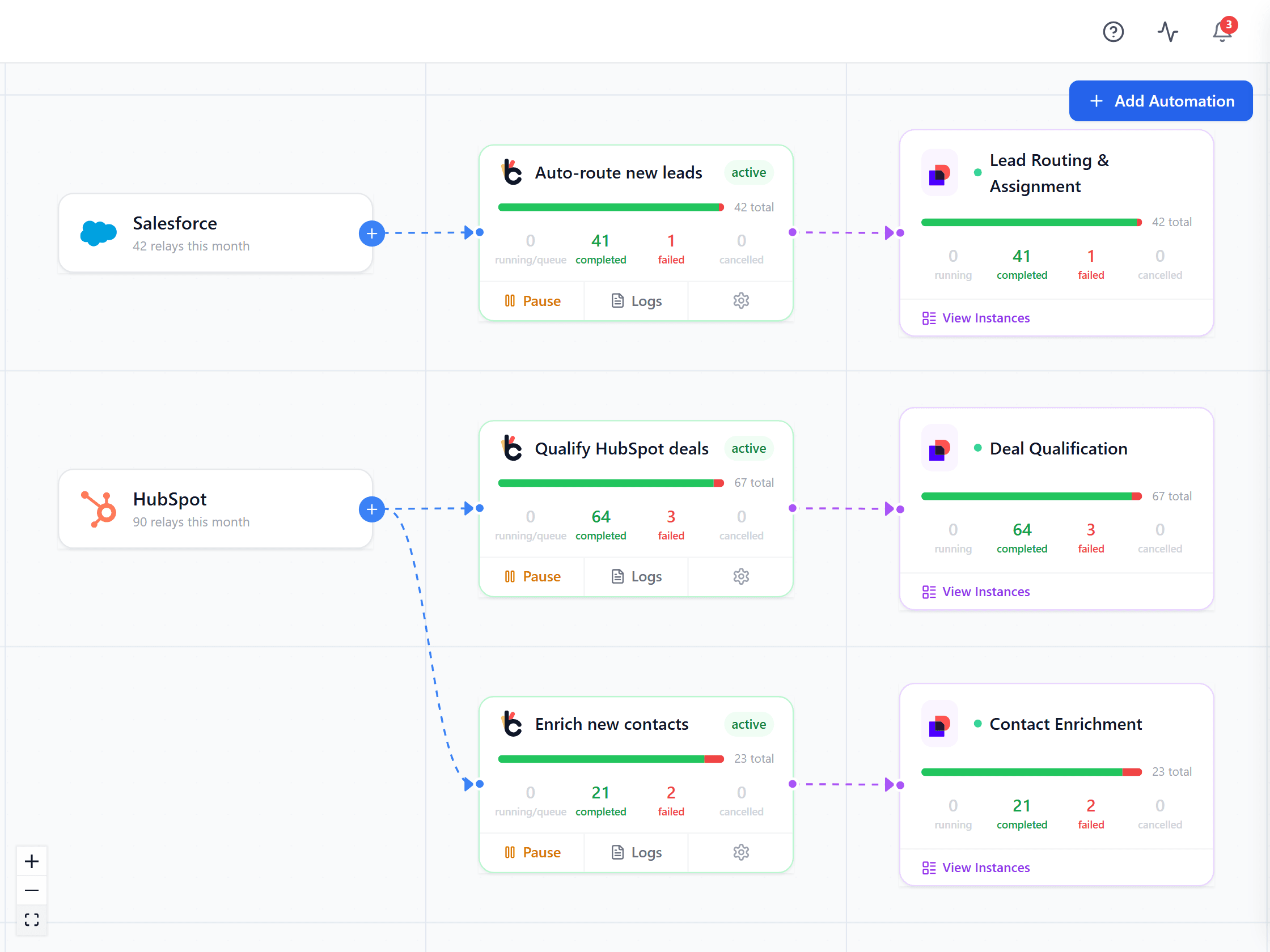
Every platform, automation and Docusign workflow on one canvas. Live relay counts per automation, logs inline, failures in red.
Run it yourself for nothing, or hand us the pager. Same engine either way.
Free to self-host.
Paid only if we run it.
- Every feature, no gated editions
- Runs in your AWS account, your region
- Source available - read and modify it
- No telemetry, no licence check
- Community support via GitHub
- Hosted, monitored and upgraded by us
- SSO and multi-organisation management
- Support with agreed response times
- Identical engine - move either way
- SLA and named support contact
- Security review support and DPA
- Deployment help in your own cloud
- Data residency in your region
What self-hosting actually asks of you
Baton runs on DynamoDB and SQS in your own AWS account. That means you terminate TLS, apply upgrades when a release ships, keep backups, and rotate your Docusign and platform credentials. Support is GitHub issues, answered on a best-effort basis. None of it is hard - the quickstart is three commands - but it is yours. If you would rather nobody on your side carried that, we will run it for you.
Common questions
Is Baton really free?
Yes, if you run it yourself. Download it, deploy it on your own infrastructure, and use it for your business at any scale without paying us anything - there is no seat count, no relay cap, and no trial clock. You pay for the AWS resources it runs on, the same as any software you host. If you would rather not run it, we host it for you; that is the part you pay for.
What is the licence, exactly?
The Sustainable Use License - a fair-code licence, not an OSI-approved open-source licence, and we do not call it open source. You can read the source, modify it, self-host it, and run it for your own business at any scale. The one restriction is that you may not offer Baton to third parties as a hosted service competing with ours. If you are deploying it inside your own company, it does not affect you. It is the same licence n8n uses.
What do I take on by self-hosting?
You run the stack. That means DynamoDB and SQS in your own AWS account, TLS in front of it, upgrades when a release ships, backups, and rotating your Docusign and platform credentials. Support is GitHub issues, answered on a best-effort basis. None of that is difficult, but it is yours. If you need an SLA, SSO, or someone on the hook for upgrades, that is what the cloud edition is for.
What does the cloud edition add?
We run the infrastructure, apply upgrades, and monitor it, so nobody on your side carries a pager. It adds SSO, multi-organisation management, and a support commitment with agreed response times. The engine is identical - same code, same connectors - so anything you build self-hosted works there, and you can move between them.
Can I start self-hosted and move to cloud later?
Yes, and plenty of teams should. Self-host to evaluate it properly against your real Salesforce and Docusign accounts, then talk to us if operating it stops being a good use of your team's time. It is the same product either way, so nothing has to be rebuilt.
Do I need a specific Docusign plan?
Baton works with Docusign accounts that have Docusign Workflow Builder. If you can build workflows in your Docusign account, you can trigger them from Baton. The developer sandbox is free, so you can test the whole path before committing to anything.
What platforms can trigger Baton?
Ten ship today - Salesforce, HubSpot, Zoho CRM, Zendesk, BambooHR, Microsoft Power Automate, Smartsheet, Airtable, Greenhouse and monday.com - plus custom POST webhooks for anything that can send JSON. Every source is signature-verified and fails closed. You can also skip webhooks entirely and launch workflows from a spreadsheet with Bulk Upload.
What happens if a delivery fails?
Baton retries with backoff, and anything that exhausts its retries lands in the Control Center - one queue of runs needing a human, where you can retry, cancel or postpone. An automation that starts failing repeatedly pauses itself rather than flooding Docusign. Every attempt is logged with its payload, so you can see exactly what happened.
Where does my data live?
In your infrastructure, when you self-host. Baton stores webhook payloads and delivery metadata in your own DynamoDB tables, in the AWS region you choose, so data residency is your decision - ca-central-1 keeps everything in Canada, for instance. The self-hosted build sends us nothing: no telemetry, no analytics, no licence check.
How long does setup take?
The app itself is up in about three minutes with Docker. Connecting Docusign takes another ten or so, and each automation after that is a few minutes - create it, copy the webhook URL, paste it into your source platform. Salesforce is the exception and needs its own setup, which the in-app guide walks through.
How is Baton different from Zapier or Make?
Zapier and Make build multi-step workflows. Baton is the layer between your systems and Docusign Workflow Builder: it verifies events, decides which workflow each one should launch, and gives you one place to watch and fix every run. They are complementary. And unlike either, you can run Baton on your own infrastructure and read every line of it.
Your Docusign Workflow Builder setup is one afternoon away.
Clone the repo, add two secrets, docker compose up -d- and open your own command center. Prefer a guided look first? Book 20 minutes and we'll walk your actual workflow on a live instance.