The visibility layer for Docusign Workflow Builder.
Baton connects your business platforms - Salesforce, HubSpot, Zoho CRM, BambooHR, and Zendesk - to Docusign Workflow Builder. Webhook-driven automation and one board for every workflow running across your systems. Set up once. Use for life.
Why a beautiful workflow engine sits idle most of the day - and what fills the vacuum.
Docusign Workflow Builder runs beautifully. Starting it does not.
Docusign IAM gives your team one of the most capable agreement engines on the market. But Docusign Workflow Builder's native trigger is a raw API call - and your CRM doesn't speak it.
So the gap gets filled by whatever's cheapest to ship that week: a Zap, a serverless function, a Google Form someone promised to fill in. It works, until it doesn't - and then no one finds out for a week.
#01 · Silent failures
The webhook fires into the void.
A deal closes. A hook fires. A Docusign workflow never starts. No alert. No retry. No one knows until the customer does.
#02 · Brittle middleware
Zaps rot. Scripts break.
Quotas blow. Auth tokens expire. Every new connection is another ticket, another point of failure, another thing someone has to remember.
#03 · No central view
Hope you remember what you were looking for.
Checking a run means navigating Docusign → Docusign Workflow Builder → Instances. Three tabs deep, no context. Multiply by the number of flows you own.
§ 02 · Setup
Three steps. One afternoon. Done for good.
Step 01
01
Connect Docusign
One-time OAuth. Baton reads your Docusign workflows and can launch them on your behalf.
Docusign IAM account
✓ authorized
Step 02
02
Pick source & target
Choose the CRM event. Choose the Docusign workflow. Baton mints a signed, unique webhook URL.
HubSpot→
Contract flow
https://app.iambaton.com/hook/a7f3
Step 03
03
Paste URL, done
Paste into your CRM's webhook settings. Add the signing secret. Baton handles verification, routing, and monitoring.
HubSpot · webhook
app.iambaton.com/hook/a7f3
From there, every qualifying event in your CRM automatically fires the right Docusign workflow, and everything surfaces in your command center.
§ 03 · Product
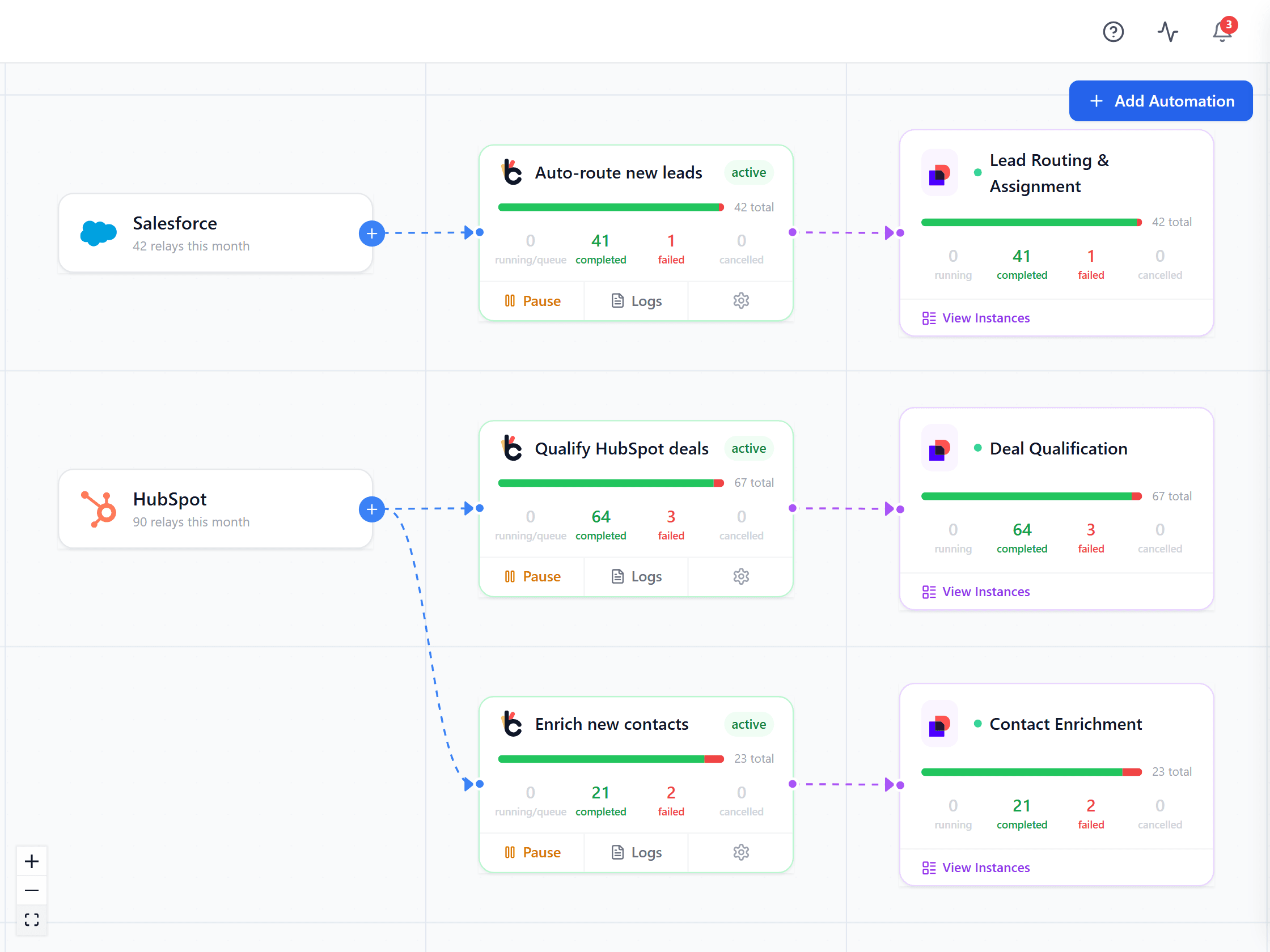
Captured from the running app. Click through the four screens you will actually live in.
Every automation. Every run. Every failure.
One place. No digging through Docusign, no switching tabs. Failures surface in red, retries are one click, logs open inline.
baton.yourcompany.com
Every platform, automation and Docusign workflow on one canvas. Live relay counts per automation, logs inline, failures in red.
§ 04 · By the numbers
What running Docusign Workflow Builder on Baton actually looks like.
Numbers from our own production tenant plus the early teams running Baton on real agreement flows.
99.98%
Delivery success
Verified webhooks routed to Docusign Workflow Builder, last 90 days across all tenants.
142ms
P95 latency
From CRM webhook received to Docusign workflow launched.
0
Silent failures
Every failure pages somebody. If Baton can't deliver, you hear about it.
~20min
Median setup
From signing up to first production webhook firing end-to-end.
§ 05 · Capabilities
Purpose-built for Docusign Workflow Builder. Nothing more, nothing less.
01 · trigger
Automatic Docusign Workflow Builder triggering
A webhook fires. Baton verifies it (HMAC or Basic Auth) and launches the right Docusign workflow with the right parameters.
02 · visibility
Visual flow dashboard
Source platforms on the left, automation rules in the middle, Docusign workflows on the right. Understand what's connected, what's firing, and what needs attention.
03 · observability
Every run, fully logged
Every webhook received, every Docusign Workflow Builder launch triggered, every instance status change - logged and searchable. Full payload inspection for debugging, with timestamps and platform attribution.
04 · mapping
Workflow Builder-native parameter matching
Baton reads what your Docusign workflow expects and matches the webhook payload against it. You keep control in Docusign Workflow Builder.
05 · monitoring
Instance monitoring & restart
Query all your Docusign workflow instances from one dashboard. See which are in progress, completed, or failed. Inspect error logs, understand what went wrong, and restart failed instances without leaving Baton.
06 · governance
Enterprise governance
Complete audit trail across every connection, automation, and run. Docusign OAuth tokens encrypted AES-256-GCM at rest. ISO 27001 certified via Fluidlabs.
§ 06 · In production
Three workflows teams switch from semi-automated to fully automated in their first week.
Turn semi-automated into fully automated.
If your agreements touch a CRM, Baton removes the manual step in between. The deal closes, Docusign Workflow Builder fires on its own.
Sales · Contract
Close the deal → sign the contract.
HubSpot
deal.closed
Baton
relay
Workflow Builder
contract
HubSpot:deal.closed→
Baton:Verify & route→
Workflow Builder:Contract workflow→
Signed→
HubSpot:Deal updated
80% of contracts sign without a manual step. Exceptions ping Slack.
Ops · Vendors
New vendor → full onboarding pack.
HubSpot
vendor.new
Baton
relay
Workflow Builder
3 docs
HubSpot:vendor.new→
Baton:Verify & route→
Workflow Builder:NDA + MSA + Terms→
Signed→
HubSpot:Contact updated
New vendors live in 48 hours. Finance stops chasing documents.
CS · Renewals
Renewal due → agreement drafted.
Zoho
renewal.flag
Baton
relay
Workflow Builder
renewal
Zoho:renewal.flag→
Baton:Verify & route→
Workflow Builder:Renewal→
Signed→
Zoho:Record updated
Zero renewals slip. Finance has real-time visibility on every account.
§ 07 · Integrations
Five platforms. One destination.
Baton wires Salesforce, HubSpot, Zoho CRM, BambooHR, and Zendesk straight into Docusign Workflow Builder. Paste a webhook URL, verify once, and the right Docusign workflow fires automatically. Need another platform? Tell us - the roadmap moves with customer need.
We built Baton for ourselves - then realized everyone needed it.
Fluidlabs builds Docusign Workflow Builder Extension Apps used by enterprise customers across CRM, construction, and HR. We've shipped to the Docusign App Center. We know the Docusign Workflow Builder API intimately because we've spent years of our lives inside it.
Baton is the piece that was always missing from client projects. We solved it a dozen times, bespoke. Eventually we made it a product.
security
ISO 27001
Certified
publisher
App Center
Publisher since 2024
specialty
Workflow Builder-native
Years of Extension App work
“
We kept solving the same integration problem for every client. Baton is that problem, solved once, for everyone.
§ 09 · Editions
Run it yourself for nothing, or hand us the pager. Same engine either way.
Baton runs on DynamoDB and SQS in your own AWS account. That means you terminate TLS, apply upgrades when a release ships, keep backups, and rotate your Docusign and platform credentials. Support is GitHub issues, answered on a best-effort basis. None of it is hard - the quickstart is three commands - but it is yours. If you would rather nobody on your side carried that, we will run it for you.
Common questions
Is Baton really free?
Yes, if you run it yourself. Download it, deploy it on your own infrastructure, and use it for your business at any scale without paying us anything - there is no seat count, no relay cap, and no trial clock. You pay for the AWS resources it runs on, the same as any software you host. If you would rather not run it, we host it for you; that is the part you pay for.
What is the licence, exactly?
The Sustainable Use License - a fair-code licence, not an OSI-approved open-source licence, and we do not call it open source. You can read the source, modify it, self-host it, and run it for your own business at any scale. The one restriction is that you may not offer Baton to third parties as a hosted service competing with ours. If you are deploying it inside your own company, it does not affect you. It is the same licence n8n uses.
What do I take on by self-hosting?
You run the stack. That means DynamoDB and SQS in your own AWS account, TLS in front of it, upgrades when a release ships, backups, and rotating your Docusign and platform credentials. Support is GitHub issues, answered on a best-effort basis. None of that is difficult, but it is yours. If you need an SLA, SSO, or someone on the hook for upgrades, that is what the cloud edition is for.
What does the cloud edition add?
We run the infrastructure, apply upgrades, and monitor it, so nobody on your side carries a pager. It adds SSO, multi-organisation management, and a support commitment with agreed response times. The engine is identical - same code, same connectors - so anything you build self-hosted works there, and you can move between them.
Can I start self-hosted and move to cloud later?
Yes, and plenty of teams should. Self-host to evaluate it properly against your real Salesforce and Docusign accounts, then talk to us if operating it stops being a good use of your team's time. It is the same product either way, so nothing has to be rebuilt.
Do I need a specific Docusign plan?
Baton works with Docusign accounts that have Docusign Workflow Builder. If you can build workflows in your Docusign account, you can trigger them from Baton. The developer sandbox is free, so you can test the whole path before committing to anything.
What platforms can trigger Baton?
Ten ship today - Salesforce, HubSpot, Zoho CRM, Zendesk, BambooHR, Microsoft Power Automate, Smartsheet, Airtable, Greenhouse and monday.com - plus custom POST webhooks for anything that can send JSON. Every source is signature-verified and fails closed. You can also skip webhooks entirely and launch workflows from a spreadsheet with Bulk Upload.
What happens if a delivery fails?
Baton retries with backoff, and anything that exhausts its retries lands in the Control Center - one queue of runs needing a human, where you can retry, cancel or postpone. An automation that starts failing repeatedly pauses itself rather than flooding Docusign. Every attempt is logged with its payload, so you can see exactly what happened.
Where does my data live?
In your infrastructure, when you self-host. Baton stores webhook payloads and delivery metadata in your own DynamoDB tables, in the AWS region you choose, so data residency is your decision - ca-central-1 keeps everything in Canada, for instance. The self-hosted build sends us nothing: no telemetry, no analytics, no licence check.
How long does setup take?
The app itself is up in about three minutes with Docker. Connecting Docusign takes another ten or so, and each automation after that is a few minutes - create it, copy the webhook URL, paste it into your source platform. Salesforce is the exception and needs its own setup, which the in-app guide walks through.
How is Baton different from Zapier or Make?
Zapier and Make build multi-step workflows. Baton is the layer between your systems and Docusign Workflow Builder: it verifies events, decides which workflow each one should launch, and gives you one place to watch and fix every run. They are complementary. And unlike either, you can run Baton on your own infrastructure and read every line of it.
§ 10 · Get started
Your Docusign Workflow Builder setup is one afternoon away.
Clone the repo, add two secrets, docker compose up -d- and open your own command center. Prefer a guided look first? Book 20 minutes and we'll walk your actual workflow on a live instance.